How to Track and Improve Your Visibility on AI Search Engines
Learn how AI visibility tracking software shows when ChatGPT, Perplexity and Google AI Overviews recommend your business and how to improve it.
4 minutes

Here's a fun test. Open ChatGPT and ask it to recommend a business like yours in your area. Did your name come up? If it didn't, you're in good company. Plenty of business owners have no idea what AI says about them and finding out is surprisingly hard.
In this post you'll find out how to see what ChatGPT, Perplexity and Google say about your business, how to find out how you compare with your competitors and how to identify what to do to get mentioned more. Want to skip the homework? Start your free 7 day trial with Midwaver and see where you stand today. No credit card needed.
Quick summary
The short answer: Ask ChatGPT, Perplexity and Google the questions your customers ask, write down whether your business is mentioned and repeat it regularly.
The catch: It works but it's slow because AI answers change every time you ask, so you need to repeat it everyday.
The shortcut: AI visibility tracking software runs the same checks every day and shows your figures and what to do to improve.
How to improve: Find the pages AI relies on, get your business mentioned there and make your own website easy for AI to understand.
What can I use to check my visibility on ChatGPT and other AI search engines?
You can use the AI tools themselves. Ask ChatGPT, Perplexity and Google the questions your customers ask and write down whether your business shows up. That's the manual method and it's free. For ongoing tracking, AI visibility tracking software does the manual work, automatically.
Let's start with the manual version because it shows you what's really going on. Here's how to do it:
Write your questions. List 10 questions a customer might ask when they're looking for what you sell such as "best accountant in Leeds" or "which accountant is best for a small business". Use everyday language and include your location if it matters.
Ask each AI tool. Put every question into ChatGPT, Perplexity and Google (look for the AI Overview at the top of the results). Open a new chat each time so earlier conversations don't influence the answer.
Record what you see. Use a simple spreadsheet. For each answer note whether your business was mentioned, whether it was actually recommended and whether your website was linked. Add which competitors appeared.
Look at the sources. Most AI tools show where an answer came from. Write those websites down because they're the pages AI trusts.
Repeat it. Ask each question everyday. AI rarely gives the same answer twice so judging yourself on one check is a bit like judging a football team on one match. Count how often you appear (for example 3 times out of 5).
Why bother with sources? Google explains in its guide to AI features and your website that AI Overviews include links to supporting pages. Being one of those pages is the goal. Ranking well on Google doesn't guarantee it though, as we explain in You Rank on Google. So Why Doesn't ChatGPT Recommend You?
Do all that and you'll know a lot more about your AI visibility than you did this morning. You'll also have spotted the catch. Ten questions across three tools asked five times each is 150 checks and that's before you do it all again the next day. Bring snacks. Our guide on how to measure your AI search visibility goes deeper on the manual method if you want to go further.
How does AI visibility tracking software work?

It automates the manual method. You add your website and some business information, choose your competitors and select the questions (called prompts) you want tracked. The software then runs them on ChatGPT, Perplexity and Google AI Overviews every day and shows your figures in a dashboard.
In Midwaver the setup looks like this:
Add your website and business information. A few details so it knows who you are and what you do.
Choose your competitors. Pick from the suggestions or add your own.
Select your prompts. These are the questions from step one of the manual method. Pick from the suggestions or add your own.
That's it. From then on the checks run automatically every day and your figures appear in a clean dashboard. No spreadsheets. Snacks optional.
So what do you get for giving up the spreadsheet?
Time back. Those 150 checks happen without you, every day.
Better data. Checking every day smooths out the wobble in AI answers so you see real trends and not lucky or unlucky days.
A history. You can see whether your numbers improve after you make changes.
Competitors alongside you. Every check covers them too.
The real answers. You can read exactly what AI said about your business. If it gets facts wrong, read why ChatGPT gets facts wrong about your business and how to fix it.
What features should I look for in AI search visibility tools?
Look for daily checks, the AI tools your customers actually use, competitor tracking, the full AI answers and clear suggestions on what to fix. A tool that hands you a score and then wishes you luck isn't much help.
Here's a simple shopping list:
Daily checks. Weekly is better than nothing but AI answers change quickly.
The right AI tools. At the very least ChatGPT, Perplexity and Google AI Overviews.
Competitor tracking. Check for caps because some tools limit how many competitors you can add.
Mentions and citations. You want to know whether you're named and which pages the AI uses as sources.
The real answers. Reading exactly what the AI says is the only way to spot the good and the bad.
Improvement suggestions. Data is nice but a to-do list is better.
A clean dashboard and exports. If you can't understand the dashboard in a minute then you won't use it. PDF and CSV exports help when you need to share results with your team.
A free trial. You wouldn't buy a car without a test drive.
Midwaver covers all of these on every plan. If you'd like to shop around first, our round-up of the 6 best tools to track brand mentions in AI search is a good place to start.
How can I compare my AI visibility with competitors?

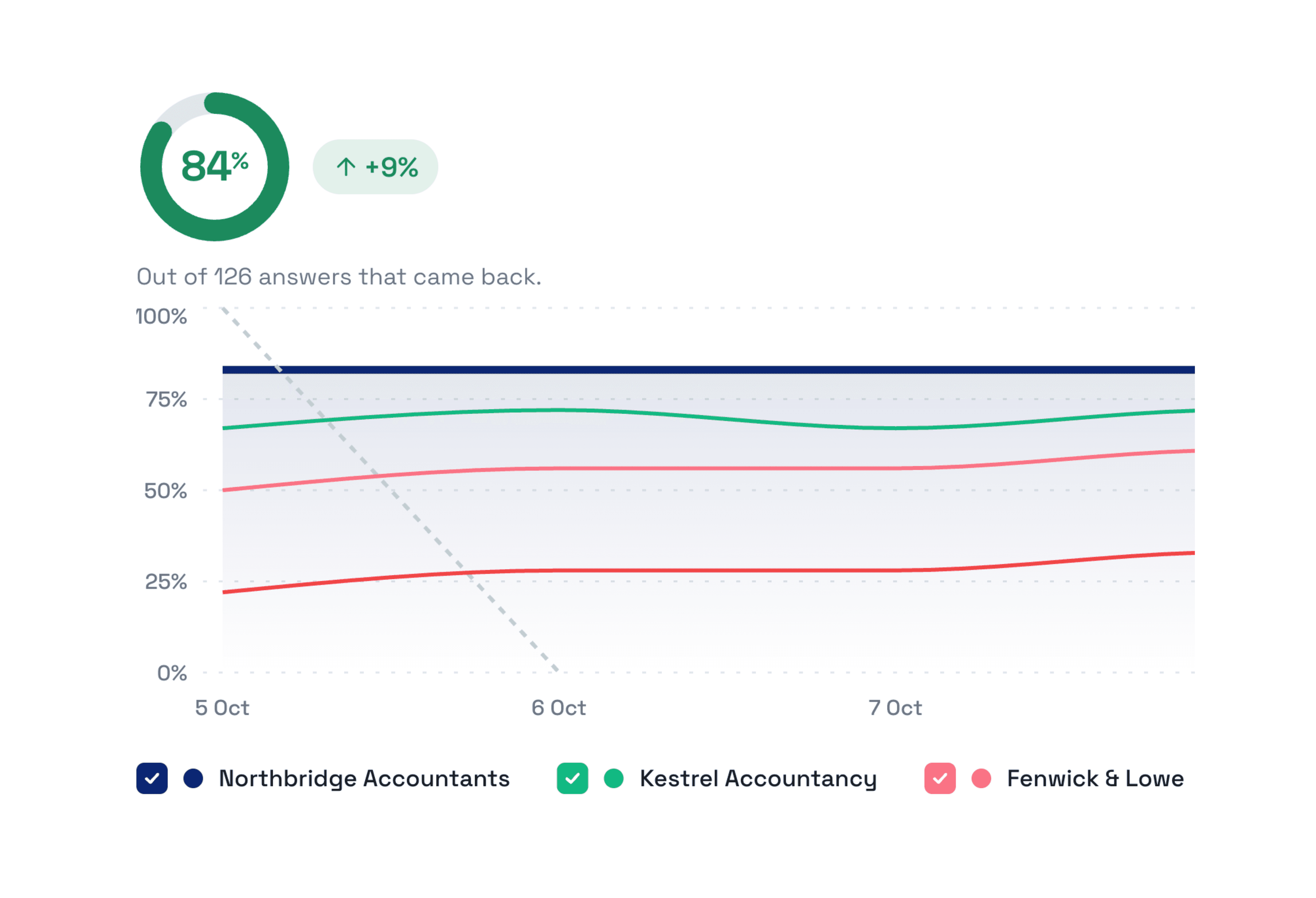
Run the same questions for your competitors and note who appears. Software does this for you and shows how you stack up on a leaderboard along with trends over time and the questions where a competitor appears and you don't.
By hand it's the same spreadsheet with a few extra columns. Either way think of it as a league table. It tells you:
Who's winning. Which businesses AI mentions most often.
Where you're losing. The exact questions where a competitor gets recommended and you don't. It's painful but very useful.
What AI trusts. The websites it keeps citing when it talks about your rivals.
Whether you're catching up. Whether the gap is closing or growing.
Spotting that you're losing is the easy bit. Improving is where it pays off. These are the fixes that tend to matter most:
Get mentioned where AI already looks. If it keeps citing a directory or review site that lists your rivals but not you then ask to be added.
Make it obvious what you do. Say it plainly on your homepage and service pages.
Answer your customers' questions. Pages that answer common questions give AI something to quote.
Let AI in. Check that your site isn't blocking AI bots.
Our AI search optimisation checklist walks through all of it. One last tip: track the competitors your customers genuinely compare you with and not just the biggest names in your industry. Watching a giant you'll never match mostly makes for a sad Monday morning.
How do I get started with AI visibility tracking?
Start by hand today with 10 questions. When you're tired of the spreadsheet start a free trial of a tracking tool and let it take over.
Write your 10 questions. The ones a customer would ask when they're ready to buy.
Run them once by hand. It takes a while but you'll see exactly where you stand.
Start a free trial. Midwaver gives you a free 7 day trial with no credit card needed. It includes up to 10 tracked prompts which happens to be the 10 questions you just wrote.
Set it up. Add your website and business info then choose your competitors and select your prompts.
Check your dashboard. See where you show up and where your rivals beat you then fix the biggest gap first.
Keep an eye on the trend. Visibility changes over time so judge the pattern and not a single day.
Search is changing. Your customers used to search on Google or Bing and get a list of links. Now they're asking AI for recommendations. Is your business being recommended?
Start your free 7 day trial with Midwaver. See what AI says about your business, who's winning in your industry and how to get mentioned more. No credit card needed, no obligation.
Don’t let AI search send your customers to a competitor.
See who's being recommended, find where you're missing out and start improving your visibility today.
No credit card required